It seems the TPROXY has been merged into Linux kernel 2.6.27-git2
And it is on 2.6.28-rc6
The corresponding iptables version seems to be released soon (1.4.3-rc1 )
It means no more patch to support this feature in kernel/iptables.
2008年11月24日 星期一

2008年4月29日 星期二
zorp I/II
Published on Linux Journal (http://www.linuxjournal.com)
Paranoid Penguin - Application Proxying with Zorp, Part I
By Mick Bauer
Created 2004-03-01 02:00
At first glance, stateful packet filtering appears to have conquered the firewall world, both in terms of market share and mind share. The list of products based on stateful packet filtering is a long one, and it includes both the proprietary industry leader, Check Point Firewall-1, and Linux's excellent Netfilter kernel code.
But what about application-layer proxies? Professional firewall engineers have long insisted there's nothing like an application-aware proxy for blocking the widest possible range of network attacks. Indeed, being such a person myself, I've been disheartened to see application-layer proxies increasingly marginalized. In some circles they've even been written off as obsolete for reasons that simply don't warrant, in my opinion, the loss of a powerful security tool. Marketing is at least as big a reason as any other.
Apparently I'm not alone in my opinion. Balazs Scheidler, creator of the essential logging facility Syslog-NG, has created Zorp, an open-source proxy firewall product that is simply brilliant. This month I explain why Zorp has helped resuscitate my faith in the application-layer proxy firewall, and what this means for anyone charged with protecting highly sensitive networks.
At this point, some of you may be asking, “What are application-layer proxying and stateful inspection? And why do I care which is better?” I can explain. Feel free to skip ahead to the next section if you're a grizzled firewall veteran.
A firewall, of course, is a computer or embedded hardware device that separates different networks from one another and regulates what traffic may pass between them. The instructions that determine which network nodes may send what type of network packets and where are called firewall rules or, collectively, the firewall policy.
These rules are what make a firewall different from an ordinary router. Routers must be programmed to know how to move packets from one network to another, but not necessarily whether to allow them to move in any given way. A firewall, on the other hand, discriminates.
One very simple way to categorize packets is by the Internet information in packets' Internet Protocol (IP) headers. An IP header contains basic information, most importantly, protocol type, source and destination addresses, and, if applicable, source and destination ports. The ports actually are part of the next header down in the packet, the UDP header or TCP header. A firewall that looks only at this basic information is called a simple packet filter. Because simple packet filters don't look deeply into each packet, they tend to be quite fast.
However, the IP header of a packet plus its TCP or UDP port number tells us nothing about that packet's relationship to other packets. For example, if we examine the IP header of an HTTP packet, we know it's a TCP packet (thanks to the IP field), where it's from and where it's going (source and destination IP address fields) and what type of application sent it (from the destination port, TCP 80). Table 1 shows an example simple packet-filtering rule.
Table 1. Simple Packet Filter Rules for HTTP
| Source IP | Destination IP | Protocol | Source Port | Destination Port | Action |
|---|---|---|---|---|---|
| Any | 192.168.1.1 | TCP | Any | 80 | Allow |
| 192.168.1.1 | Any | TCP | 80 | Any | Allow |
But that level of inspection leaves out some key pieces of information about the HTTP connection: whether the packet is establishing a new HTTP session, whether it's part of a session in progress or whether it's simply a random, possibly hostile, packet not correlating to anything at all. This information is left out because crucial session-related information such as TCP flags, TCP sequence numbers and application-level commands, all are contained deeper within the packet than a packet filter digs. That's where stateful packet filtering comes in.
A stateful packet filter, like a simple packet filter, begins by examining each packet's source and destination IP addresses, and source and destination ports. But it also digs deeper into the packet's UDP or TCP header to determine whether the packet is initiating a new connection. If it is, the firewall creates an entry for the new connection in a state table. If it isn't, the stateful packet filter checks the packet against the state table to see if it belongs to an existing connection. A stateful packet filter will block packets that pretend to be part of an existing connection, but aren't. Actually, UDP is connectionless, but a good stateful firewall can guess that an outbound DNS query to a given server on UDP 53 should be followed by an inbound response from that server's UDP port 53. Stateful packet filtering has two main benefits over simple packet filtering.
First, firewall rules can be simpler. Rather than needing to describe both directions of each bi-directional transaction, such as HTTP, firewall rules need address only the initiation of each allowed transaction. Subsequent packets belonging to established, allowed connections can be handled by the firewall's state table, independently of explicit rules. In Table 2 we see that only one rule is needed to allow the same HTTP transaction for which we needed two rules in Table 1.
Table 2. Stateful Packet Filter Rule for HTTP
| Source IP | Destination IP | Protocol | Source Port | Destination Port | State | Action |
|---|---|---|---|---|---|---|
| Any | 192.168.1.1 | TCP | Any | 80 | New | Allow |
The second main benefit of stateful packet filtering is we don't have to do such distasteful things as allowing all inbound TCP and UDP packets from the Internet to enter our internal network if they have a destination port higher than 1024. This is the sort of thing you sometimes must do if you don't have a better way to correlate packets with allowed transactions. In other words, stateful packet filtering provides better security than simple packet filtering.
“Cool”, you say, “stateful packet filters are more efficient and secure”, which is true. But what about the things even stateful packet filters don't consider? What about things like potentially malformed HTTP commands or intentionally overlapping IP fragments? Might there be a type of firewall that examines each packet in its entirety or that has some other means of propagating the fewest anomalous packets possible?
Indeed there is, and it's called an application-layer proxy or application-layer gateway. Whereas packet filters, whether simple or stateful, examine all packets and pass those that are allowed, an application-layer proxy breaks each attempted connection into two, inserting itself in the middle of each transaction as an equal participant. To the client or initiator in each transaction, the firewall acts as the server. To the intended destination, or server, the firewall acts as the client.
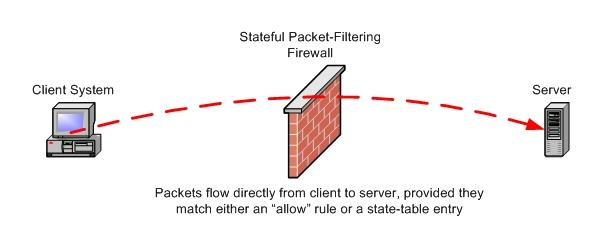
Figures 1 and 2 illustrate this difference. In Figure 1, we see that the stateful packet filter passes or blocks transactions but ultimately is an observer in that it passes allowed packets more or less intact, unless, for example, it performs network address translation (NAT). In contrast, in Figure 2 we see that the firewall terminates each allowed connection to itself and initiates a new, proxied connection to each allowed connection's desired actual endpoint.
 [1]
[1]Figure 1. With a stateful packet filter, packets flow directly from client to server, provided they match either an allow rule or a state-table entry.
 [2]
[2]Figure 2. With an application-layer proxy, the connection is split in two. To the client, the firewall appears to be the server (transaction #1). To the server, the firewall appears to be the client (transaction #2).
Proxying comes in two flavors, transparent and nontransparent. In a transparently proxied connection, both parties are unaware that the connection is being proxied; the client system addresses its packets as though there were no firewall, with their true destination IP address. By contrast, in a nontransparently proxied connection the client must address its packets to the firewall rather than to their true destinations. Because the client must, in that case, somehow tell the firewall where to proxy the connection, nontransparent proxying requires clients to run proxy-aware applications. Although most Web browsers and FTP clients can be configured to use a nontransparent proxy, transparent proxies are easier for end users to live with than are nontransparent proxies. Modern application-layer proxies, such as Zorp, are transparent.
Transparent or not, proxying has several important ramifications. First, low-level anomalies, such as strange flags in the IP header, generally are not propagated by the firewall. The firewall initiates the secondary connection in the way that it, not the client system, considers an acceptable manner. Second, because the firewall is re-creating the client connection in its entirety and not merely propagating or trivially rewriting individual packets, the firewall is well positioned to examine the connection at the application layer. This is not a given, however; if the firewall is, say, a SOCKS firewall and not a true application-layer proxy, it simply could copy the data payloads of the client connection packets into those of the new, proxied packets. But if the firewall is application-aware, like Zorp is, the firewall not only examines but makes decisions about the data payloads of all client packets.
Let's look at an example: suppose your public Web server is vulnerable to a buffer-overflow exploit that involves a malformed HTTP GET command containing, say, an abnormally long URL. Your application-layer proxy firewall initially accepts the connection from the client, but upon examining the long URL, closes the connection with an error message to the client and a reset to the server, without ever forwarding the attack payload, the long URL.
The third ramification isn't a positive one: by definition, proxying is more resource-intensive than is packet filtering, and application-aware proxying is especially so. This strike against application-layer proxies is, however, generally overstated. Zorp, for example, can proxy 88Mbps worth of HTTP traffic, nearly twice the capacity of a T-3 WAN connection, running on only a 700MHz Celeron system with 128MB of RAM. Zorp, on a dual-processor Pentium system with 512MB of RAM and SCSI RAID hard drives, can handle around 480Mbps, according to the Zorp Professional v2 Product Description, available at www.balabit.com [3].
In summary, application-layer proxies provide superior protection by inserting themselves in the middle of each network transaction they allow by re-creating all packets from scratch and by making intelligent decisions on what application-layer commands and data to propagate. They accomplish this based on their knowledge about how those applications are supposed to work, not merely on how their container packets ought to look. The main strike against application-layer proxies is performance, but thanks primarily to Moore's Law, this shortcoming is mitigated amply by fast but not necessarily expensive hardware.
In the interest of full disclosure, I should mention one other shortcoming that many people perceive in application-layer proxies, greater complexity. It stands to reason that because application-layer proxies are more sophisticated than packet filters, it should take more sophistication to configure them, in the same way that you need to know more to operate a Mosler safe than to operate your typical bus station locker. It's more work to configure a firewall running Zorp or Secure Computing Sidewinder than it is to configure one running Check Point Firewall-1 or Linux Netfilter/iptables.
But isn't better security worth a little extra work? Like everything else in information security, it's up to you to choose your own trade-off. Maybe the extra work is worth it to you, and maybe it isn't. Either way, I hope this column makes you glad you've got the choice in the first place. The remainder of this article, which continues with at least one more installment, explains precisely what's involved in configuring and using Zorp.
The proxy dæmons that comprise Zorp run on top of the Linux kernel concurrently with the standard Netfilter and Balabit-provided TPROXY kernel modules. In theory, this makes Zorp distribution-agnostic, and it's designed to compile cleanly on any Linux distribution that meets certain requirements (see below). Zorp is developed on Debian Linux, however, and the vast majority of Zorp documentation assumes that you're running Debian too. In fact, Zorp GPL is an official Debian package (as of this writing, in Debian's testing and unstable releases).
Zorp is available in three versions: Zorp GPL, the free GPLed version; Zorp Unofficial, a cutting-edge or beta version of Zorp GPL; and Zorp Professional (or simply Zorp Pro), a commercial product based on but with more features than Zorp GPL. If you purchase Zorp Pro, you get a bootable CD-ROM that installs not only Zorp Pro but ZorpOS, a stripped-down Debian distribution optimized for Zorp. With Zorp Pro, a bare-metal Zorp installation takes less than 15 minutes, excluding subsequent configuration, of course. Anyone who's suffered through lengthy dselect sessions while trying to install just enough Debian for one's needs can appreciate the beauty of this.
Zorp Pro also includes the new Zorp Management Server (ZMS), which allows you to manage multiple Zorp firewalls from a central management host. The host in turn can be operated remotely with ZMC, a GUI client available in both Debian Linux and Windows versions. ZMS is functionally equivalent to Check Point Firewall-1's management module, arguably the biggest reason Check Point has conquered the enterprise firewall world. ZMS has the potential to make Zorp very attractive indeed to sites with a lot of firewalls to manage.
ZMS/ZMC is still a little rough around the edges—Balabit isn't expecting to release a consumer-installable version of that part of Zorp Pro in March 2004 (though at the time of this writing it is being used, successfully, by paying customers). Even if you don't use ZMS/ZMC, Zorp Pro's smooth installation and wide range of features, including several application proxies not supported in Zorp GPL, make Zorp Professional worthwhile.
Unlike Zorp Pro, Zorp GPL and Zorp Unofficial require a working Linux installation that includes the following: glib 2.0, Python 2.1, libcap 1.10 and openssl 0.9.6g. It also requires either a Linux 2.2 kernel compiled with IP, firewalling and transparent proxy support or a Linux 2.4 kernel compiled with iptables, iptables connection tracking, iptables NAT and, using Balabit's TPROXY kernel patch (www.balabit.com/products/oss/tproxy [4]), iptables transparent proxying. All of these features should be compiled as modules.
Once your OS is ready, you either can install Zorp GPL from binary deb packages or compile Zorp GPL from source code (available at www.balabit.com/downloads [5]). Compiling Zorp GPL is a little more involved than your typical ./configure make make install routine; see the Zorp GPL Tutorial at www.balabit.com/products/zorp_gpl/tutorial [6] for detailed instructions.
Next time, I'll describe how to set up Zorp GPL to protect a typical Internet—DMZ—Trusted Network topology.
Source URL: http://www.linuxjournal.com/article/7296
Links:[1] http://www.linuxjournal.com/files/linuxjournal.com/linuxjournal/articles/072/7296/7296f1.png
[2] http://www.linuxjournal.com/files/linuxjournal.com/linuxjournal/articles/072/7296/7296f2.png
[3] http://www.balabit.com
[4] http://www.balabit.com/products/oss/tproxy
[5] http://www.balabit.com/downloads
[6] http://www.balabit.com/products/zorp_gpl/tutorial
Published on Linux Journal (http://www.linuxjournal.com)
Paranoid Penguin - Application Proxying with Zorp, Part II
By Mick Bauer
Created 2004-04-01 02:00
In my last column, I sang the praises of application-layer proxy firewalls and introduced Balazs Scheidler's Zorp firewall suite, available in both commercial and free-of-charge versions. This column continues where we left off, discussing basic Zorp configuration for a simple inside-DMZ-outside scenario. We are going to configure only a couple of services, but this should be enough to help prospective Zorp users begin building their own intelligent firewall systems.
To review, application-layer proxies broker rather than merely pass the traffic that flows through them. For example, when a user on one network initiates an HTTP session on the other side of a proxying firewall, the firewall intercepts and breaks the connection, acting both as the server (from the client's viewpoint) and as the client (from the destination server's standpoint).
Zorp uses transparent proxies, which means that users behind a Zorp firewall need not be aware that the firewall is there; they may target foreign addresses and hostnames without configuring their software to communicate with the proxy. This is an important mitigator against the ugly fact that proxies are inherently more complicated than other kinds of firewalls. With Zorp, all the complexity is in the back end, resulting in much happier end users.
But that doesn't mean Zorp is painful for its administrators, either. I'd rate its complexity as being higher than iptables but lower than sendmail.cf. So without further ado, let's configure ourselves a Zorp firewall.
This article assumes that, per my last column, you've successfully patched your Linux 2.4 kernel and your iptables binary to support the TPROXY module (see www.balabit.com/products/oss/tproxy [1]). It also assumes you have compiled and/or installed packages for libzorpll, zorp and zorp-modules; source code and deb packages are available at www.balabit.com/products/zorp_gpl [2]. My examples further assume you're running Zorp GPL version 2.0, though the examples should apply equally to Zorp Pro 2.0. Zorp Pro has some proxy modules not included with Zorp GPL, but the modules common to both behave the same.
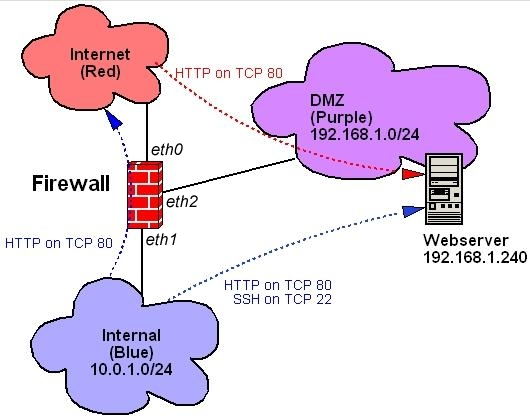
Zorp supports many more than three interfaces per firewall, but the most common firewall architecture nowadays is the three-homed-host architecture shown in Figure 1. This is the architecture I cover here.
 [3]
[3]Figure 1. Example Architecture
Similarly, as you can see in Figure 1, we've got only three data flows: HTTP from the Internet to a DMZed Web server; HTTP from the internal network to the Internet; and HTTP and SSH from the internal network to the DMZ. Absent are things like IMAP, NNTP, FTP and other services that even simple setups commonly use. If you understand how to configure Zorp to accommodate these, though, you should be able to figure out others. I do, however, discuss DNS and SMTP, even though I omitted them from Figure 1.
The first thing we need to do doesn't directly involve Zorp but rather the TPROXY kernel module. In transparent proxying, TPROXY needs a dummy network interface to bind to whenever it splits a data flow in two. This needs to be an interface whose IP address is neither Internet-routable nor associated with any network connected to the firewall.
Linux 2.4 kernels compile with support for dummy network interfaces by default. You should have one, unless you intentionally compiled your kernel without dummy driver support. If so, compile a new kernel with dummy support. All you need to do for TPROXY's purposes, therefore, is explicitly configure dummy0 with a nonroutable and unused address. In Debian, you should add the following lines to /etc/networking/interfaces:
auto dummy0
iface dummy0 inet static
     address 1.2.3.4
     netmask 255.255.255.255
Other distributions handle network configuration differently—Red Hat and SuSE use ifcfg- files in /etc/sysconfig/network—but hopefully you get the picture. Notice the 32-bit network mask: I repeat, this address must not belong to a real network.
You may be wondering, isn't this article about Zorp and not iptables? Yes, but Zorp runs in conjunction with iptables, not in place of it. TPROXY, in fact, is specifically a Netfilter patch. To use TPROXY, we need to configure it with the iptables command, as we do for the rest of Netfilter. (Netfilter is the proper name for Linux 2.4's firewall code—iptables is its front-end command.)
In addition, it's recommended that you run certain services, namely DNS and SMTP, on the firewall as self-contained proxies. If you do, you need to use iptables to configure your firewall to accept those connections directly. For example, BIND v9 supports split-horizon DNS, in which external clients are served from different zone files than are internal clients. Similarly, Postfix is easy to configure to act as a relay on behalf of internal hosts, but strictly as a local deliverer when dealing with external hosts. It makes sense to run such proxy-like services on a firewall, as long as you configure them extremely carefully.
If you're new to Netfilter/iptables, what follows may make little sense, and space doesn't permit me to explain it all in detail. Zorp is, after all, an advanced tool. In a nutshell, what we're going to do with iptables is run all packets through some simple checks against spoofed IP addresses. We then are going to intercept packets that need to be proxied transparently and process them in custom chains rather than by using the normal FORWARD chain. Technically, nothing is forwarded. Finally, we pass some packets that are destined for the firewall itself.
Zorp Pro includes a group of scripts collectively called iptables-utils, which simplify iptables management for Zorp. A free version of iptables-utils for Zorp GPL 2.0 is available at www.balabit.com/downloads/zorp/zorp-os/pool/i/iptables-utils [4]. I highly recommend iptables-utils, as it makes it much easier to test a new iptables configuration before actually committing it.
Because it uses a syntax that I don't have space here to explain, the following example is instead a conventional iptables startup script. Here are the most important parts of such a script. First should come rules for the special tproxy table that the TPROXY module adds to Netfilter (Listing 1). This is where we define a custom proxy chain for each of our networks: PRblue for proxied connections initiated from our internal network; PRpurple for proxied connections initiated from our DMZ (none, in this scenario); and PRred for proxied connections originating from the Internet.
Several things are worth pointing out in Listing 1. First, notice that the tproxy table contains its own PREROUTING and OUTPUT output chains. In Zorp, we use the tproxy/PREROUTING chain to route packets to the proper custom proxy chain (PRblue), based on the interface each packet enters. As with any custom iptables chain, if a packet passes through one of these without matching a rule, it's sent back to the line immediately following the rule that sent the packet to the custom chain. This is why custom chains don't have default targets.
In the PRblue chain, we've got two rules, one for each type of transaction allowed to originate from the internal network. All outbound HTTP material is proxied, that is, handed to a proxy process listening on port 50080. But in the SSH rule, we tell Netfilter to proxy all outbound SSH traffic unless it's destined for the firewall itself. Although Figure 1 doesn't show such a data flow (Blue→SSH→firewall), we need it in order to administer the firewall. This flow also requires a rule in the regular filter table's INPUT chain. In this example scenario, our DMZed Web server isn't permitted to initiate any connections itself, so we've created a PRpurple chain without actually populating it.
Now we move on to the regular filter table, this is the Netfilter table most of us are used to dealing with—it's the default when you omit the -t option with iptables. Listing 2 shows our example firewall's filter table's INPUT rules.
The first few lines check packets against some custom chains that check for spoofed IP addresses; if they pass those checks, they continue down the INPUT chain. Packets generated by the TPROXY module itself are accepted, as are packets belonging to established allowed transactions and loopback packets (lines 4–6, respectively). Next, as with the tproxy table's PREROUTING chain, we route packets to custom chains based on ingress interface. This time, the custom chains are for packets with local destinations, as opposed to proxied ones, so I've named them LOblue and so forth. Next come our filter table's custom chains (Listing 3).
The first three of these custom chains are the most important: LOblue, LOpurple and LOred tell Netfilter how to process packets destined for the firewall itself, based on in which interface the packets arrive. In LOblue, we're accepting DNS queries, SSH connections and SMTP connections. In LOpurple, we're accepting only DNS queries. And in LOred, we're accepting DNS replies from our ISP's DNS server (upstream.dns.server) and SMTP connections. The last three of these custom chains are the simplest: noise filters NETBIOS packets, those notorious clutterers of Linux firewall logs; spoof filters for packets with obviously spoofed, that is, impossible, source IP addresses; and spoofdrop logs and drops packets caught by the spoof chain.
Listing 4 shows the remainder of our example iptables script, an essentially empty FORWARD chain with a default DROP policy and an empty OUTPUT chain with a default ACCEPT chain. Again, this is a proxying firewall, so it won't forward anything. You may be uneasy with the default ACCEPT policy for firewall-originated packets, but this is both necessary and safe on a Zorp firewall.
Finally, we come to actual Zorp configuration files. These are stored in /etc/zorp, and the first one we tackle is instances.conf, which defines and controls Zorp's instances. Usually, the rule of thumb is to define one instance per network zone, so in our example scenario we have, you guessed it, one instance each for our red, purple and blue zones. Listing 5 shows what such an instances.conf file would look like.
The first field in each line is the name of the instance. This is user-definable, but we need to refer to it verbatim in the Zorp configuration file proper, policy.py. Speaking of which, you may use separate configuration files for each instance if you wish, or you may configure multiple zones within a single file. Regardless, the -p option in instances.conf tells Zorp which file to use for each instance.
The -v parameter sets log message verbosity: 3 is the medium setting, and 5 is useful for debugging. This parameter controls only Zorp-generated log messages and has no effect whatsoever on Netfilter/iptables logging. Finally, each line ends with an --autobind-ip setting that determines to which dummy IP Zorp should bind TPROXY when proxying connections. This IP address can and should be shared between all instances. This address, obviously, should be the one you set earlier (see Configuring a Dummy Interface, above).
Your iptables script determines how packets get routed to proxies, and /etc/zorp/instances.conf determines how Zorp starts up. But to tell Zorp's proxies how to behave, you need to set up /etc/zorp/policy.py, or whatever you called the configuration file(s) referenced in instances.conf—policy.py is conventional but not mandatory. This policy file contains two parts. The first part is a global section in which zones are defined based on network addresses and allowed services. The second part is a service-instance definition section in which each instance listed in instances.conf is defined based on which services originate in each and in which those services are mapped to application proxies.
Listing 6 shows a complete global section from our example policy.py. It begins with some import sections, in which essential Python functions are included. Next come our zone definitions. If you set up instances.conf to run one Zorp instance per zone, your zone names here can be similar to or even the same as your instance names. In Listing 6 I've chosen different names in order to illustrate that technically, zone names are distinct from instance names.
In each zone definition, you can see a network address that corresponds to those in Figure 1 and specifications of which services are allowed. These service names are user-definable and fleshed out in the subsequent service-instance definitions. The important thing to understand about these statements is that inbound and outbound is relative to the zone/network, not to the firewall.
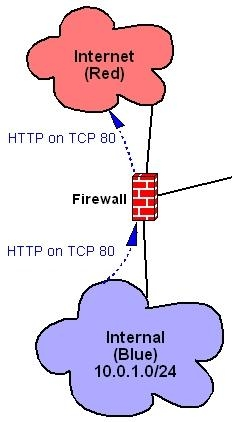
Figure 2 shows what the internal-to-Internet HTTP data flow looks like as a proxied connection. In this illustration, we see this data flow exists both as an outbound connection out of the Internal (blue) zone and an inbound connection to the Internet (red) zone. This is borne out in the respective bluezone and redzone definitions in Listing 6. It's also important to use the same service name in both zone definitions that a given data flow traverses (blue_http in the case of Figure 2 and Listing 6).
 [5]
[5]Figure 2. An HTTP Transaction Outbound from Blue, Inbound to Red
The last point to make about Listing 6 is the * wild card signifies all defined services. This is narrower than it might seem; * includes only those services defined in policy.py's service-instance definitions, not all possible services. Remember, Zorp processes only those packets that Netfilter and TPROXY send to it. If a given zone is to allow no outbound or inbound services, the inbound_services or outbound_services parameter may be either omitted or set to [] (empty brackets).
Listing 7 shows our policy.py file's service-instance definitions. The first line of each definition must reference an instance name specified in instances.conf, and the following lines in the definition must be indented because these rules are processed by Python, which is precise about indentation. The definition can't be empty: if no services originate in a given instance, the token pass may be used, as with the purple() instance definition in Listing 7.
Otherwise, the definition should consist of one or more Service lines, specifying a service name referenced in one or more zone definitions, and a Zorp proxy module, either a built-in proxy included in the global import statements or defined in a custom class. The last field in a Service line is a router, which specifies where proxied packets should be sent. You can see in Listing 7 that for the red_http service, we've used the forge_addr=TRUE option to pass the source IPs of Web clients intact from the Internet to our Web server. Without this option, all Web traffic hitting the DMZ appears to originate from the firewall itself.
Although in Listing 7 we're using only the HttpProxy and the PlugProxy (a general-service UDP and TCP proxy that copies application data verbatim), Zorp GPL also has proxies for FTP, whois, SSL, telnet and finger. As I mentioned before, you also can create custom classes to alter or augment these proxies. It's easy to create, for example, an HTTP proxy that performs URL filtering or an SSL proxy stacked on an HTTP proxy so HTTPS traffic can be proxied intelligently. Unfortunately, these are advanced topics I can't cover here; fortunately, all of Zorp's Python proxy modules are heavily commented.
The TransparentRouter referenced in Listing 7 simply proxies the packets to the destination IP and port specified by the client. But in the red instance's red_http service, we see that a DirectedRouter, which requires a mandatory destination IP and port, may be specified instead.
Each Service line in a service-instance definition must have a corresponding Listener line. This line tells Zorp to which local (firewall) IP address and port the service should be bound. It may seem counterintuitive that the ports specified in Listing 7's Listener statements are high ports: 50080 instead of 80 and 50022 instead of 22. But remember, each proxy receives its packets from the kernel through Netfilter, not directly from clients. Accordingly, these high ports must correspond to those specified in your tproxy table Netfilter rules (Listing 1).
I mentioned that unlike HttpProxy, which is a fully application-aware proxy that enforces all relevant Internet RFCs for proper HTTP behavior, PlugProxy is a general-service proxy (GSP). Using PlugProxy still gives better protection than does packet filtering on its own, because the very act of proxying, even without application intelligence, insulates your systems from low-level attacks that Netfilter may not catch on its own.
And with that, we've scratched the dense surface of Zorp GPL. This is by far the most complex tool I've covered in these pages, but I think you'll find Zorp to be well worth the time you invest in learning how to use it.
Source URL: http://www.linuxjournal.com/article/7347
Links:[1] http://www.balabit.com/products/oss/tproxy
[2] http://www.balabit.com/products/zorp_gpl
[3] http://www.linuxjournal.com/files/linuxjournal.com/linuxjournal/articles/073/7347/7347f1.png
[4] http://www.balabit.com/downloads/zorp/zorp-os/pool/i/iptables-utils
[5] http://www.linuxjournal.com/files/linuxjournal.com/linuxjournal/articles/073/7347/7347f2.png
[6] http://www.balabit.com
[7] http://www.balabit.com/downloads/zorp/zorp-os
[8] https://lists.balabit.hu/mailman/listinfo/zorp
transparent proxy for squid in bridge configuration
Squid Config Example
Fully Transparent With TPROXY
Linux: Setup a transparent proxy with Squid in three easy steps
Squid Cache, TProxy, dan Mikrotik (Alternate Configuration for Simple Networks)
Configuring a Transparent Proxy/Webcache in a Bridge using Squid and ebtables
Squid 2.6 + tproxy + bridge + gentoo
To configure a bridge interface
To intercept the concerned connections:
The first command says that packets passing through the bridge going to port 80 will be redirected to the local machine, instead of being bridged. The second uses iptables to redirect those packets to local port 3128, so squid can take care of them.
Fully Transparent With TPROXY
Linux: Setup a transparent proxy with Squid in three easy steps
Squid Cache, TProxy, dan Mikrotik (Alternate Configuration for Simple Networks)
Configuring a Transparent Proxy/Webcache in a Bridge using Squid and ebtables
Squid 2.6 + tproxy + bridge + gentoo
To configure a bridge interface
ifconfig eth0 0.0.0.0 promisc up
ifconfig eth1 0.0.0.0 promisc up

brctl addbr br0
brctl addif br0 eth0
brctl addif br0 eth1

ifconfig br0 200.1.2.3 netmask 255.255.255.0 up
route add default gw 200.1.2.254 dev br0
To intercept the concerned connections:
bash# ebtables -t broute -A BROUTING -p IPv4 --ip-protocol 6 \
        --ip-destination-port 80 -j redirect --redirect-target ACCEPT

bash# iptables -t nat -A PREROUTING -i br0 -p tcp --dport 80 \
        -j REDIRECT --to-port 3128
The first command says that packets passing through the bridge going to port 80 will be redirected to the local machine, instead of being bridged. The second uses iptables to redirect those packets to local port 3128, so squid can take care of them.
2008年4月2日 星期三
iptables TPROXY target
2007-09-30 20:51:41 GMT, KOVACS Krisztian posted a series of patchs for TPROXY: [PATCH 00/13] Transparent Proxying Patches, Take 3
2007-10-02 20:37:56 GMT, KOVACS Krisztian: Transparent proxy patches, take 4 - userspace
2007-10-02 20:39:42 GMT, KOVACS Krisztian: [PATCH 00/13] Transparent Proxying Patches, Take 4
2007-10-13 17:28:57 GMT, KOVACS Krisztian posted a series of patchs for TPROXY: [PATCH 00/14] Transparent Proxying Patches, Take 5
there is a lot of patches in http://people.netfilter.org/hidden/tproxy/
Squid (WWW Proxy Server)/TPROXY Rules
Transparent Proxy with Linux and Squid mini-HOWTO
LVS and transparent proxy
[stunnel-users] [stunnel patch] transparent proxy on linux 2.6 using cttproxy patch
fedora download
===========================================================================
RedHat EL5.0 上で kernel2.6(tproxy2.0.6パッチ付き)をビルドする方法(メモ)
Ver1.00 2007/08/31 吉岡
===========================================================================
1. Linux Kernelをkernel.orgから入手・展開
入手元: http://kernel.org/
(ここではlinux-2.6.20.18.tar.bz2を利用)
# cd /usr/src/
# wget http://kernel.org/pub/linux/kernel/v2.6/linux-2.6.20.18.tar.bz2
# tar -jxvf linux-2.6.20.18.tar.bz2
2. tproxyパッチを入手・適用
入手元: http://www.balabit.com/downloads/files/tproxy/obsolete/linux-2.6/cttproxy-2.6.20-2.0.6.tar.gz
# cd /usr/src
# wget http://www.balabit.com/downloads/files/tproxy/obsolete/linux-2.6/cttproxy-2.6.20-2.0.6.tar.gz
# tar -zxvf cttproxy-2.6.20-2.0.6.tar.gz
# mv linux-2.6.20.18 linux-2.6.20.18-tproxy
# cd linux-2.6.20.18-tproxy/
# cat ../linux-2.6.20.18-tproxy/patch_tree/* | patch -p1
3. Kernelを設定
# cd linux-2.6.20.18-tproxy/
# make menuconfig
以下のように設定変更
- General setup
- Local version: (-tproxy)
- Networking
- Networking options
- Network packet filtering framework (Netflter)
- Core Netfilter Configuration
(M) Netfilter connection tracking support
Netfilter connection tracking support
=> (X) "Layer 3 Dependent Connection tracking (OBSOLETE)"
- IP: Netfilter Configuration
(M) Full NAT (NEW)
(M) MASQUERADE target support
(M) REDIRECT target support
[*] NAT reservations support
(M) FTP protocol support
(M) Transparent proxying
(M) tproxy match support
(M) TPROXY target support
- Device Drivers
- Network device support
利用しているインターフェースのドライバを指定
([M]又は[*]で組み込み。)
設定が終了したら[Exit]で終了し、設定を保存(Yes)。
4. Kernelのビルド
# make
5. Kernelのインストール
# make modules_install
# cp arch/i386/boot/bzImage /boot/vmlinuz-2.6.20.18-tproxy
# mkinitrd /boot/initrd-2.6.20.18-tproxy.img 2.6.20.18-tproxy
(上書きする場合、mkinitrdに"-f"を追加)
6. grub.confの書き換え
以下のように設定ファイルに変更します。
ファイル: /etc/grub.conf
追加内容:
===================================================
title Red Hat Enterprise Linux Server (2.6.20.18-tproxy)
root (hd0,0)
kernel /vmlinuz-2.6.20.18-tproxy ro root=/dev/VolGroup00/LogVol00 rhgb quiet
initrd /initrd-2.6.20.18-tproxy.img
===================================================
7. マシンをリブートし、ブート時にKernelとして2.6.20.18-tproxyを選択。
8. 以下のFAQに従ってtproxyを設定
■54028: 透過プロキシ型の場合にクライアントのソースIPアドレスを保持することはできますか?
(http://www.f-secure.co.jp/support/html/linux_gw_54028.html)
2007-10-02 20:37:56 GMT, KOVACS Krisztian: Transparent proxy patches, take 4 - userspace
2007-10-02 20:39:42 GMT, KOVACS Krisztian: [PATCH 00/13] Transparent Proxying Patches, Take 4
2007-10-13 17:28:57 GMT, KOVACS Krisztian posted a series of patchs for TPROXY: [PATCH 00/14] Transparent Proxying Patches, Take 5
there is a lot of patches in http://people.netfilter.org/hidden/tproxy/
Squid (WWW Proxy Server)/TPROXY Rules
Transparent Proxy with Linux and Squid mini-HOWTO
LVS and transparent proxy
[stunnel-users] [stunnel patch] transparent proxy on linux 2.6 using cttproxy patch
fedora download
===========================================================================
RedHat EL5.0 上で kernel2.6(tproxy2.0.6パッチ付き)をビルドする方法(メモ)
Ver1.00 2007/08/31 吉岡
===========================================================================
1. Linux Kernelをkernel.orgから入手・展開
入手元: http://kernel.org/
(ここではlinux-2.6.20.18.tar.bz2を利用)
# cd /usr/src/
# wget http://kernel.org/pub/linux/kernel/v2.6/linux-2.6.20.18.tar.bz2
# tar -jxvf linux-2.6.20.18.tar.bz2
2. tproxyパッチを入手・適用
入手元: http://www.balabit.com/downloads/files/tproxy/obsolete/linux-2.6/cttproxy-2.6.20-2.0.6.tar.gz
# cd /usr/src
# wget http://www.balabit.com/downloads/files/tproxy/obsolete/linux-2.6/cttproxy-2.6.20-2.0.6.tar.gz
# tar -zxvf cttproxy-2.6.20-2.0.6.tar.gz
# mv linux-2.6.20.18 linux-2.6.20.18-tproxy
# cd linux-2.6.20.18-tproxy/
# cat ../linux-2.6.20.18-tproxy/patch_tree/* | patch -p1
3. Kernelを設定
# cd linux-2.6.20.18-tproxy/
# make menuconfig
以下のように設定変更
- General setup
- Local version: (-tproxy)
- Networking
- Networking options
- Network packet filtering framework (Netflter)
- Core Netfilter Configuration
(M) Netfilter connection tracking support
Netfilter connection tracking support
=> (X) "Layer 3 Dependent Connection tracking (OBSOLETE)"
- IP: Netfilter Configuration
(M) Full NAT (NEW)
(M) MASQUERADE target support
(M) REDIRECT target support
[*] NAT reservations support
(M) FTP protocol support
(M) Transparent proxying
(M) tproxy match support
(M) TPROXY target support
- Device Drivers
- Network device support
利用しているインターフェースのドライバを指定
([M]又は[*]で組み込み。)
設定が終了したら[Exit]で終了し、設定を保存(Yes)。
4. Kernelのビルド
# make
5. Kernelのインストール
# make modules_install
# cp arch/i386/boot/bzImage /boot/vmlinuz-2.6.20.18-tproxy
# mkinitrd /boot/initrd-2.6.20.18-tproxy.img 2.6.20.18-tproxy
(上書きする場合、mkinitrdに"-f"を追加)
6. grub.confの書き換え
以下のように設定ファイルに変更します。
ファイル: /etc/grub.conf
追加内容:
===================================================
title Red Hat Enterprise Linux Server (2.6.20.18-tproxy)
root (hd0,0)
kernel /vmlinuz-2.6.20.18-tproxy ro root=/dev/VolGroup00/LogVol00 rhgb quiet
initrd /initrd-2.6.20.18-tproxy.img
===================================================
7. マシンをリブートし、ブート時にKernelとして2.6.20.18-tproxyを選択。
8. 以下のFAQに従ってtproxyを設定
■54028: 透過プロキシ型の場合にクライアントのソースIPアドレスを保持することはできますか?
(http://www.f-secure.co.jp/support/html/linux_gw_54028.html)
訂閱:
文章 (Atom)